Here’s a common but surprisingly obscure React performance issue that I keep seeing over and over: a single hydration mismatch on a page can take Largest Contentful Paint from green all the way to red.
Refresher: what’s a hydration mismatch? Hydration is when React makes server-rendered DOM interactive, going over it, attaching all event listeners (
onClicketc) to the right DOM nodes, and executinguseEffects. Hydration mismatch happens when client-rendered DOM is different from server-rendered DOM – e.g.:function MyButton() { if (typeof window === 'undefined') return <div>Please wait for the app to load...</div>; return <button onClick={() => console.log('Clicked')}>Click me</button>; }In this situation, as React walks DOM, it expects to find a
buttonand attach anonClickto it – but finds adivinstead. This is a mismatch.
Let’s talk about why this happens. To do so, here are three facts (some of which you may already know).
Fact 1: Text Resizes When Fonts Load
If you use web fonts (and font-display: swap), as the page loads, you’d regularly see text shift like this:
This is super common, and it happens because the same characters have different physical sizes in different fonts. So when a web font loads, a text element would often get a few pixels larger or smaller.
Fact 2: LCP Measures Only New DOM Nodes
Largest Contentful Paint (LCP) measures how long it takes for the largest element on the page to render. Here’s how it does that, simplified:
Sidenote: Largest Contentful Paint (LCP) is one of Google’s Core Web Vitals. Having it green is critical for good search engine ranking.
- when the page becomes visible, the browser finds the largest element on the page. This element becomes the LCP candidate, and LCP is set to the time when it appeared
- when a new element is added to the DOM, the browser compares its size to the size of the current LCP candidate. If it’s larger, it becomes the new LCP candidate, and LCP is set to the new time
- this continues until the user interacts with the page
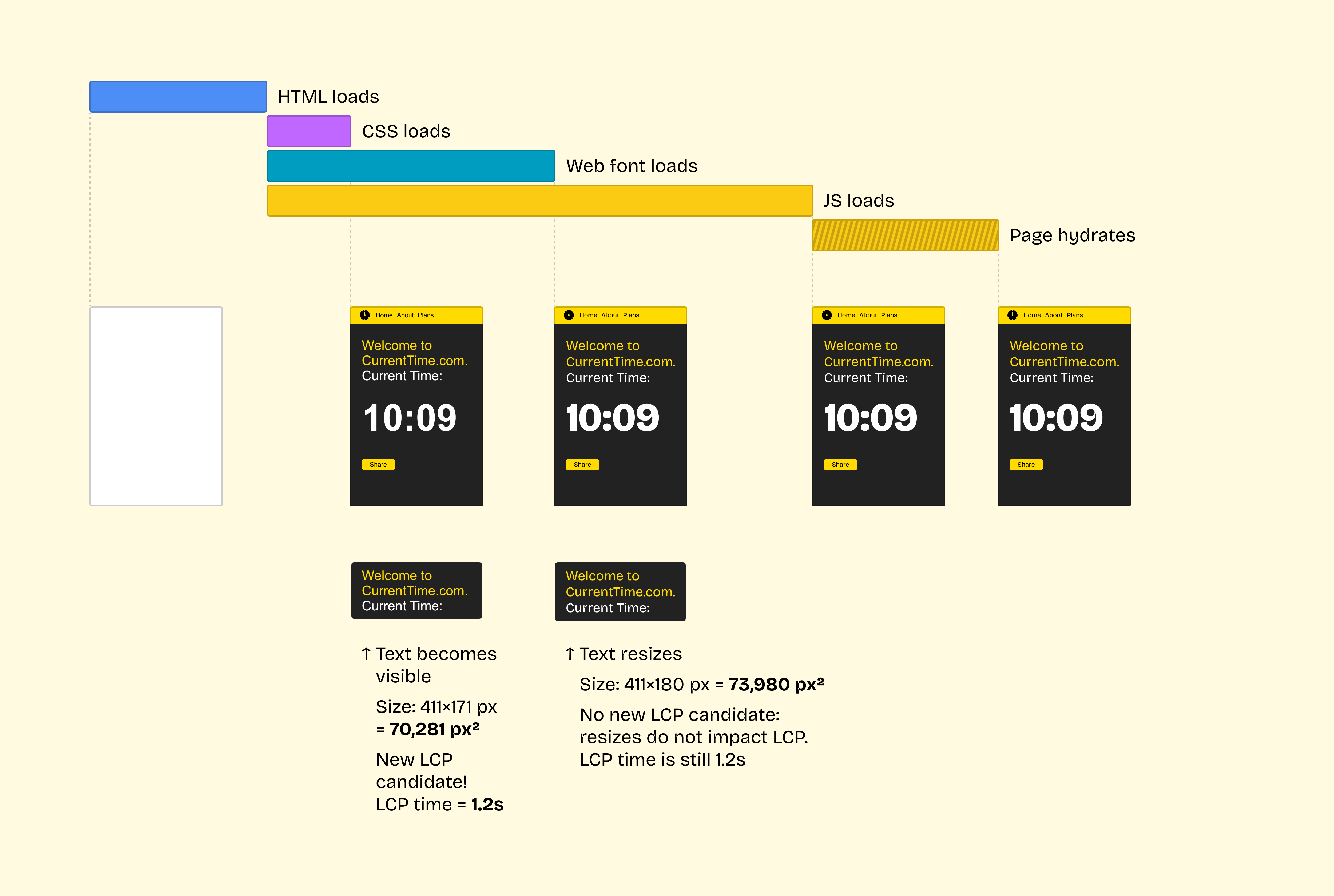
Crucially, the browser only compares sizes when new elements are added. If an existing element becomes larger, the browser ignores that:
Fact 3: Hydration Mismatches Force a New DOM
Hydration mismatches force React to recreate the DOM from scratch.
If the server rendered <span>Current time: 10:09</span> but the client rendered <span>Current time: 10:10</span>, React would not simply patch the time. Instead, it would delete all server-rendered DOM and replace it with the client-rendered DOM.
Sidenote: React used to just patch hydration mismatches, but this was killed in React 18 for correctness reasons.
The only exception to this is when the mismatch happens inside a <Suspense> boundary. In this case, React would only replace DOM in the nearest Suspense boundary around this <span>.
The user would normally not see anything, but the browser would register a completely new DOM tree.
Resized Text + DOM Remount = 💥
You might see where this is going.
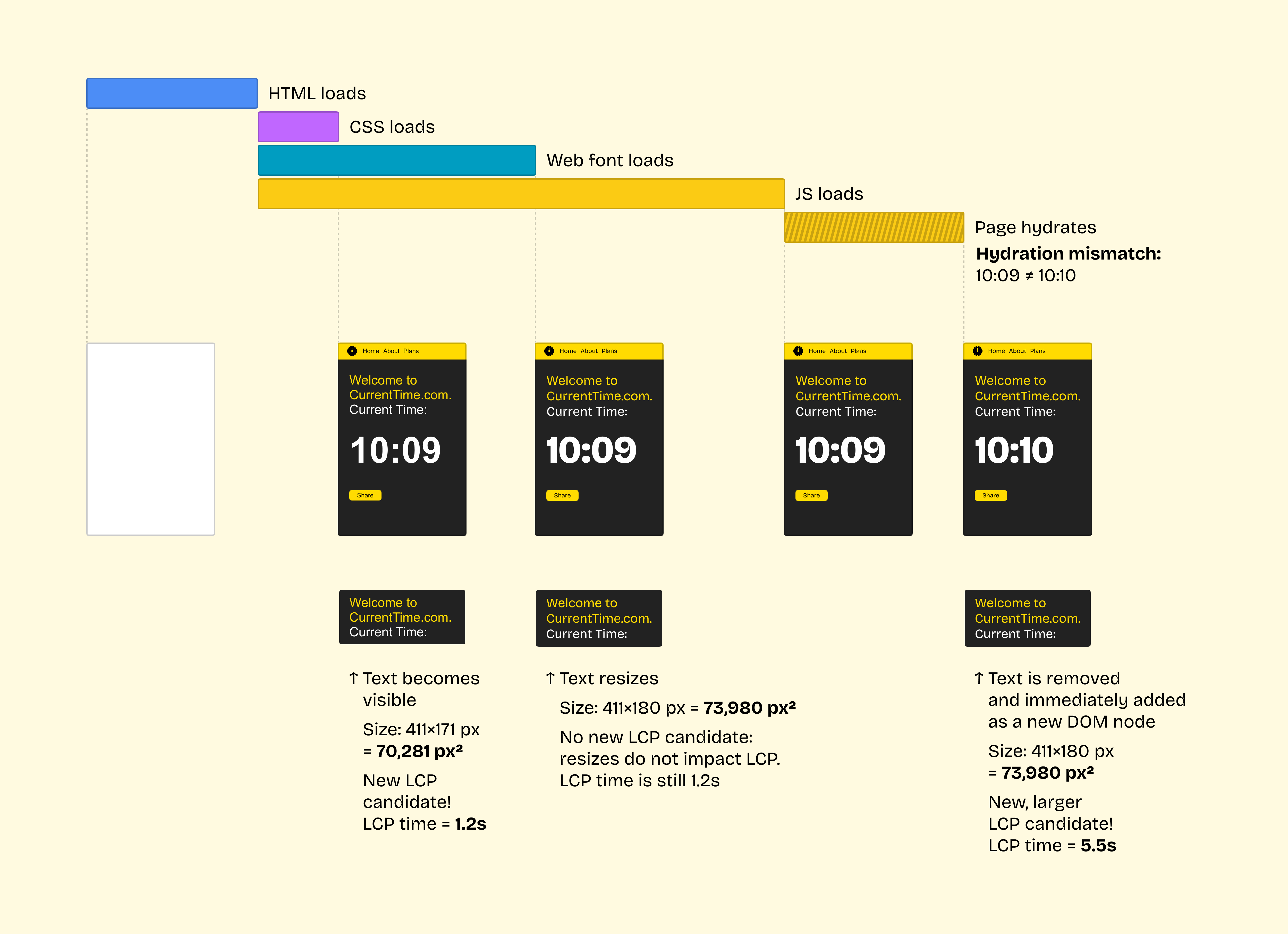
What happens when we have a) a text block that was small but became larger, and b) a hydration mismatch that remounted that text? Right – LCP goes up:
Ouch!
If it wasn’t for a hydration mismatch, LCP would occur when the text first becomes visible.
Unfortunately, in this case, hydration replaces all elements on the page. To the user, nothing changes: they still see the same text! But to the browser, React just deleted all DOM nodes and added a bunch of completely new nodes. Hence, the browser measures them, finds a text node that’s larger than previously recorded, and updates the LCP value.
In practice, on typical mobile connections/React pages, this is enough to increase LCP by a few seconds, making it red.
How to Detect This
To confirm whether this is happening on a page, record a loading performance trace in Chrome DevTools, save it to a file, and then search for largestContentfulPaint::Candidate in the trace. You’ll find each LCP candidate that Chrome recorded:
{
  "args": {
    "data": {
      "candidateIndex": 1,
      "isMainFrame": true,
      "isOutermostMainFrame": true,
      "navigationId": "12CC2149AFB70519E35C60D70CC8EEAF",
      "nodeId": 84,
      "nodeName": "H1 class='hero-text'", // node pseudo-selector
      "performanceTimelineNavigationId": 9781,
      "size": 158070, // node size in pixels²
      "type": "text"
    },
  },
  "ts": 452806722536, // time in microseconds
  ...
}

{
  "args": {
    "data": {
      "candidateIndex": 2,
      "isMainFrame": true,
      "isOutermostMainFrame": true,
      "navigationId": "12CC2149AFB70519E35C60D70CC8EEAF",
      "nodeId": 103,
      "nodeName": "H1 class='hero-text'", // node pseudo-selector
      "performanceTimelineNavigationId": 9781,
      "size": 168215, // node size in pixels²
      "type": "text"
    },
  },
  "ts": 452810364068, // time in microseconds
  ...
}
If you see the same nodeName get two LCP candidates several seconds apart with a barely different size, there’s a good chance this is what’s happening.
(And, of course, check the console for React minified error #418.)
How to Solve This
Fix hydration mismatches when you run into them.
If you can’t: wrap an element that causes a mismatch with <Suspense>. Then, instead of remounting the full DOM, React would remount only that <Suspense> boundary. Unless that element is also the LCP element, this would prevent the issue.
With thanks to Andy Davies who taught me to inspect LCP candidates in a Chrome trace and helped me discover this.

