I regularly help people with performance of their React apps. Here’s a common but surprisingly obscure issue that I keep seeing over and over:
A single hydration mismatch on a page can tank Largest Contentful Paint from green all the way to red
To avoid it, it’s enough to avoid hydration mismatches. But to understand why it’s an issue, you need to puzzle together three separate facts.
Refresher: what’s a hydration mismatch? Hydration is when React makes server-rendered DOM interactive, going over it, attaching all event listeners (
onClicketc) to the right DOM nodes, and executinguseEffects. Hydration mismatch happens when client-rendered DOM is different from server-rendered DOM – e.g.:function MyButton() { if (typeof window === 'undefined') return <div>Please wait for the app to load...</div>; return <button onClick={() => console.log('Clicked')}>Click me</button>; }In this situation, as React walks DOM, it expects to find a
buttonand attach anonClickto it – but finds adivinstead. This is a mismatch.
Fact 1: Hydration Mismatches Force a New DOM
Hydration mismatches force React to recreate the DOM from scratch.
Sidenote: React used to just patch hydration mismatches. But this was killed in React 18 for correctness reasons.
If the server rendered <span>Current time: 10:09</span> but the client rendered <span>Current time: 10:10</span>, React would not simply patch the time, no. It would find the nearest Suspense boundary around this <span> and remount its whole DOM from scratch. If the app has no Suspense boundary, the entire page would remount.
Fact 2: Text Resizes When Fonts Load
Here’s the second piece of the puzzle.
If you use web fonts (and font-display: swap), as the page loads, you’d frequently see text shift like this:
This happens because the same characters tend to have different physical sizes in different fonts. So when a web font loads, and a text element switches from a system font to that web font, it would often get a few pixels larger or smaller.
Fact 3: LCP Measures Only New DOM Nodes
Here’s the third and final piece of this puzzle.
Largest Contentful Paint (LCP) measures how long it takes for the largest element on the page to render. Here’s how it does that:
Sidenote: Largest Contentful Paint (LCP) is one of Google’s Core Web Vitals. Having it green is critical for good search engine ranking, not speaking of user experience.
- the first time the page becomes visible, the browser finds the largest text element or image on the page and records its size. This element becomes the LCP candidate, and the time when it appeared becomes the LCP time
- whenever a new element gets added into DOM, the browser measures its size. If that element is larger than the previous LCP candidate, it becomes the new LCP candidate, and LCP time increases
- this also happens whenever an image loads
- as soon as the user interacts with the page, the browser stops new measurements
Critically for this puzzle, step 2 only runs when new elements are added. If an existing element becomes larger, the browser ignores that:
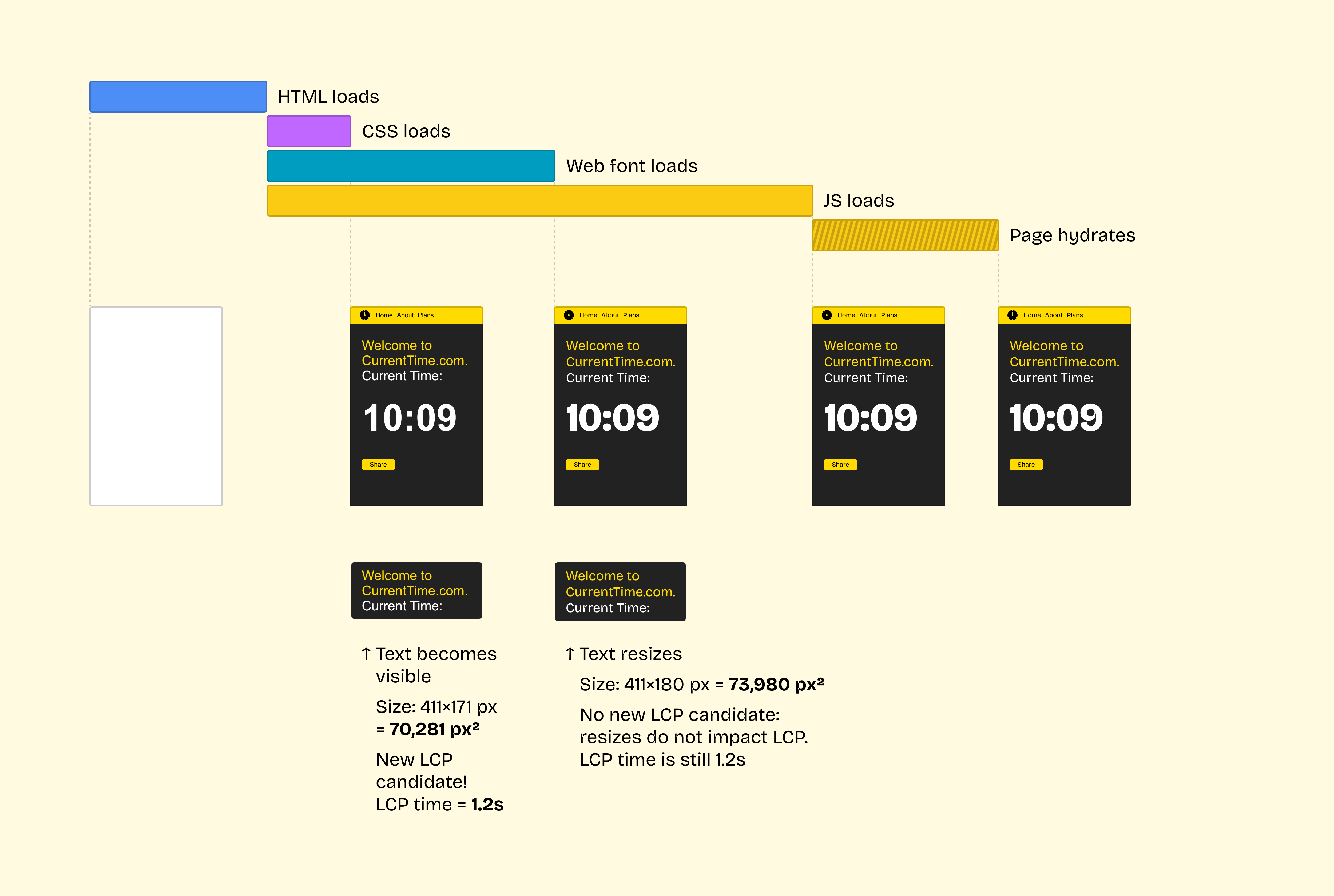
Resized Text + DOM Remount = 💥
Now let’s combine all pieces of the puzzle.
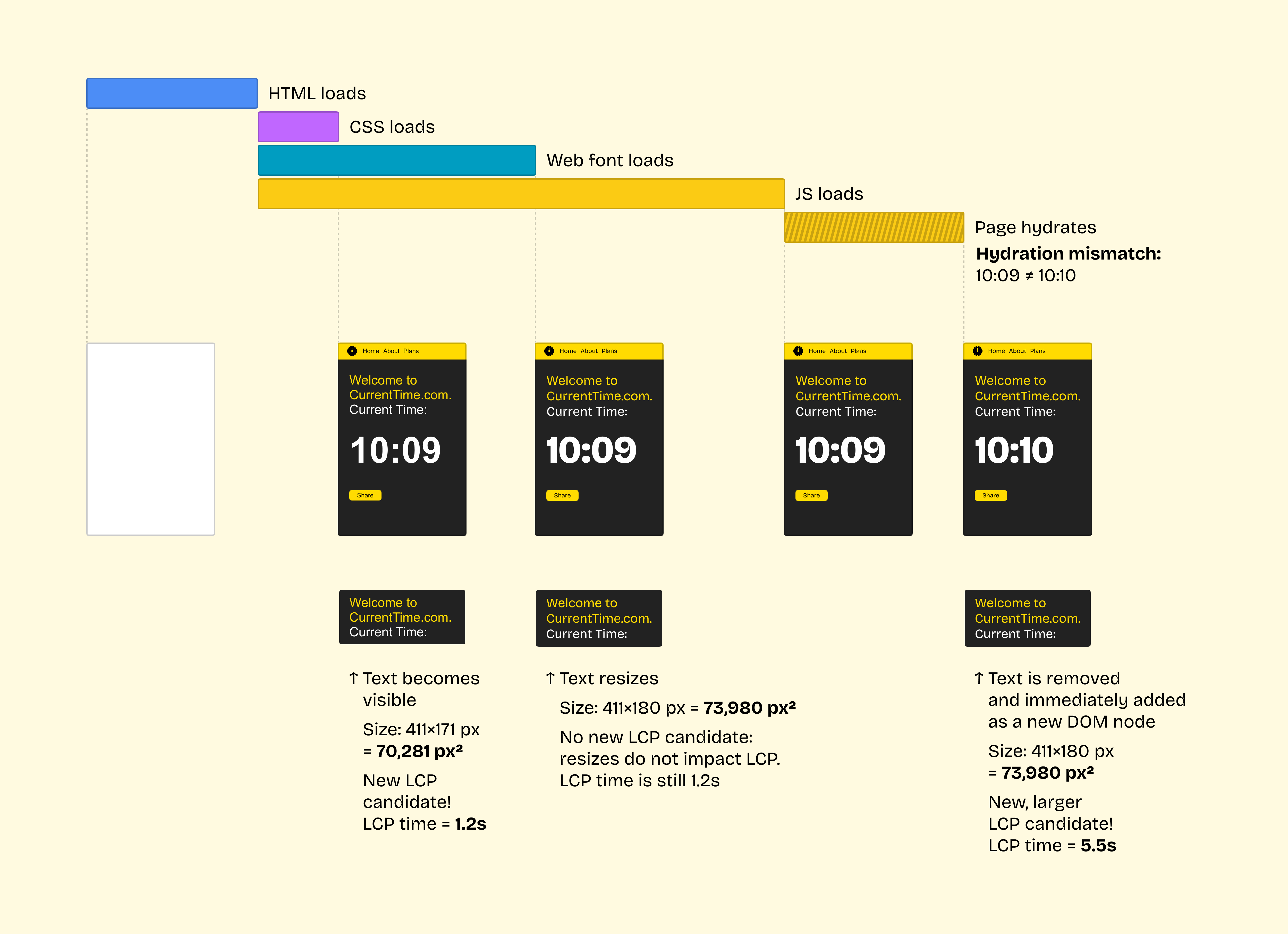
What happens when we have a) a text block that becomes larger when fonts load, and b) a hydration mismatch that remounts that text block? Here’s what:
Ouch!
If it wasn’t for a hydration mismatch, LCP would occur when the text first becomes visible.
Unfortunately, in this case, hydration replaces all elements on the page. To the user, nothing changes: they still see the same text! But to the browser, React just deleted all DOM nodes and added a bunch of completely new nodes. Hence, the browser measures them, finds a text node that’s larger than previously recorded, and updates the LCP value.
Now, due to the mismatch, LCP is registered only when hydration completes. On a typical 4G connection and a typical React page, this would happen at the 5+ second mark, taking LCP from green or yellow deep into red.
How to Deal With This
Avoid hydration mismatches. Fix them if you run into them.
If you can’t: wrap the element that causes a mismatch with <Suspense>. Then, instead of remounting the full DOM, React would remount only that <Suspense> boundary. Unless that element is also the LCP element, this would prevent the issue.
With thanks to Andy Davies who taught me to inspect LCP candidates in a Chrome trace and helped me discover this.

